Microsoft Windows 11 KB5083769 Remote Desktop changes 04/14/2026
Its a new week and a new Tuesday Microsoft update, this is the breakdown to stay protected after Microsoft's Windows 11 update. Update KB5083769 released the Windows 11 April Patch Tuesday 14th, 2026. The new updates are available under KB5083769 for versions 25H2 and 24H2. Alongside other changes, the new patch brings some big updates related to a new security vulnerability.
Due to this, when opening RDP the popup in the screen below will appear. You can safely connect if the Address in the Dialog box is a server you are familiar with. The reason this is changing is due to hackers now sending compromised .RDP files via email phishing which allows hackers to access systems. Remember, never open any file attachment in an email that contains an .RDP file! In general, no one should be sending RDP files to you, if you do receive one contact your IT department immediately as it can be fraudulent; used to connect to a remote computer for the hacker.
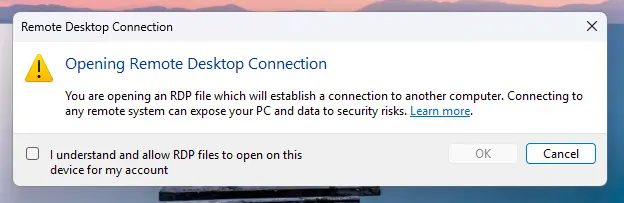
After Checking off on the consent banner, there will be a second one. The banners will display the remote computer address, publisher information when available, and any requested access to local resources (your camera, and clipboard being some things requested) . All requested settings are disabled by default, meaning users must explicitly enable them before connecting. In addition, a one‑time warning appears the first time an RDP file is opened so as to caution users about the risks. If you are wondering, these changes do not affect connections started manually in the Remote Desktop app. It is only triggered when opening an RDP file.
What Microsoft has changed
The new protections work in a few layers. The first time you open an RDP file after installing the update, Windows displays a one-time educational prompt that explains what RDP files actually do and the risks. You acknowledge it and press OK.
Microsoft has explained how redirection can expose sensitive files or allow malware to be planted on systems. For example, clipboard sharing can leak passwords or confidential text while smart cards and Windows Hello credentials can be misused for unauthorized access. Microphones and cameras can lead to surveillance, and even printers, ports, and location data can be exploited in malicious ways.
The new dialog highlights these requests showing whether the file is signed and by whom. Unsigned files now display “Unknown publisher” with a "Caution" mark while signed files show the publisher’s name but still advise careful verification, since attackers can use deceptive names. As long as it shows that your server's IP address or the hostname of your server, it is safe to proceed.
While Microsoft states there are some work around to stop these from happening, we are evaluating those "fixes" to determine if they work. Let us know if you have any questions, and stay safe on the web!